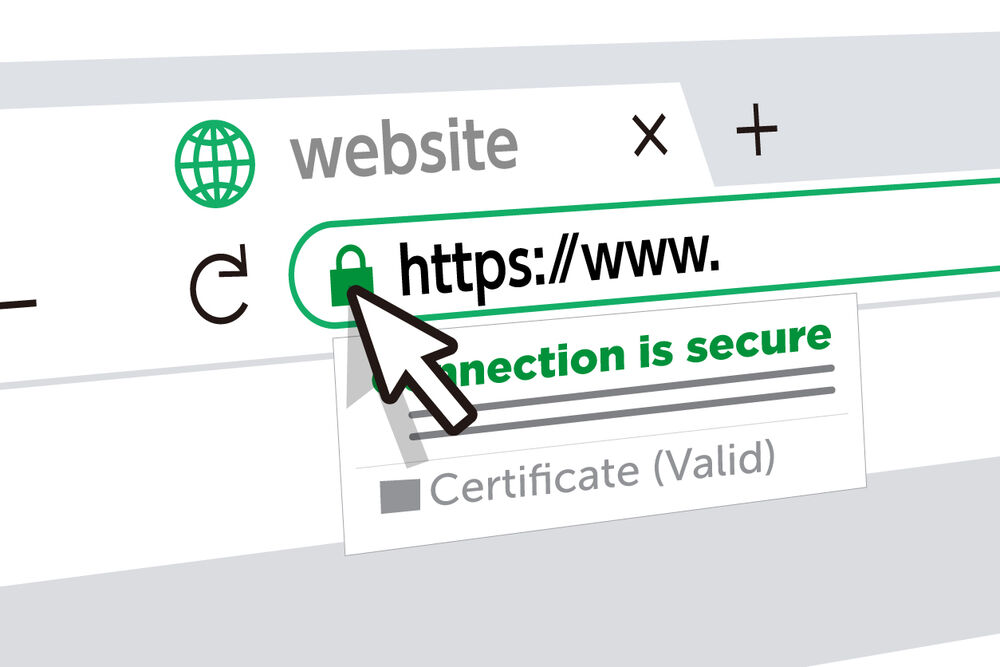
Open your browser right now.
Look at the very beginning of the web address in the bar at the top of the screen. Do you see a small padlock icon? Does the address start with https:// — with that "s" at the end?
If yes, the website you are on has an SSL certificate installed. The connection between your browser and that website is encrypted and secure.
Now think about your own business website. Open it. Look at the same address bar.
If you see http:// without the "s" — or a warning that says "Not Secure" — your website is missing something that is quietly costing you customers, damaging your Google ranking, and in 2026, actively alarming every visitor who lands on your pages.
This guide explains what an SSL certificate is, why your Nigerian business website cannot function without one, how to check whether yours is missing, and — critically — how to get it fixed, often completely free.
What Is an SSL Certificate? (Plain Language, No Jargon)
SSL stands for Secure Sockets Layer. An SSL certificate is a digital security file that does one primary job: it encrypts the connection between your website and the person visiting it.
Here is what that means in plain language.
When someone visits your website and fills in a contact form — typing their name, phone number, email address — that information travels from their browser to your website's server. Without an SSL certificate, that data travels in plain text. Anyone who intercepts it along the way can read it. A hacker, a malicious network, a compromised WiFi connection at an Abuja hotel or a Lagos coffee shop — they could all potentially capture that information and read it as clearly as you are reading this sentence.
With an SSL certificate installed, that same data is scrambled — encrypted — before it leaves the visitor's browser. Even if someone intercepts it, all they see is unreadable code. The data can only be unscrambled by your server, which holds the matching encryption key.
That is the core function of SSL: encryption. But in practice, SSL has become much more than a technical security measure. It has become one of the most visible and powerful trust signals on the internet — and in the Nigerian market specifically, where online trust is fragile and hard-won, that matters enormously.
When an SSL certificate is installed correctly, two things change on your website:
- The web address changes from http:// to https:// — that extra "s" stands for "secure"
- A small padlock icon appears in the browser address bar
These two visual cues are what Nigerian customers — and every internet user — have been trained to look for as proof that a website is legitimate and safe to use.
The "Not Secure" Warning: What Your Visitors See Without SSL
Here is something most Nigerian business owners do not realise until it is pointed out to them.
When a visitor using Google Chrome — the most widely used browser in Nigeria and globally — visits a website without an SSL certificate, Chrome does not just quietly note the absence of a padlock. In recent versions of Chrome, HTTP sites actively display a "Not Secure" warning in the address bar.
Starting in October 2026, Google Chrome is taking this further: every visitor using Chrome will now encounter a security warning before accessing any HTTP site — a bypassable warning screen that explicitly tells the visitor the connection is not secure before allowing them to proceed.
Think about what this means for a Nigerian business website without SSL.
A potential client finds your website on Google at 10pm. They click your link. Before they even see your homepage, Chrome shows them a warning: "This site is not secure." They have to actively choose to proceed — or they close the tab and go back to find a different business.
Even the visitors who do proceed have already had their confidence shaken. The very first thing they experienced on your website was a security warning. You have not yet said a word about your services, your experience, your pricing, or your portfolio — and already, doubt has been planted.
In a market like Nigeria where nearly 60% of internet users have encountered some form of online scam — as covered in our guide on how to make Nigerian customers trust your business website — a "Not Secure" warning is not a minor inconvenience. It is often the end of the visit.
Seeing a "Not Secure" notice next to your domain name can elicit a negative response from your site's visitors. If you don't have your users' trust, it can seriously impact your bottom line — and if you're collecting any user information, even through something as simple as a contact form, the "Not Secure" warning is enough to turn visitors away.
5 Reasons Your Nigerian Business Cannot Afford to Skip SSL
1. It Directly Affects Whether Customers Trust You
For Nigerian online shoppers, the padlock icon has become a non-negotiable trust signal. In a market shaped by years of online fraud and scam experiences, customers have learned — sometimes through painful personal experience — to look for the padlock before entering any information on a website.
Nigerian shoppers know what to look for online. That padlock icon means safety. SSL encryption shows you protect their data, whether they are buying products, making enquiries, or filling out forms. More trust equals more completed transactions.
For businesses running eCommerce stores, this is especially critical. No serious Nigerian buyer will enter their card details on a website their browser is actively warning them about. SSL is not just a best practice for eCommerce websites — it is a prerequisite for anyone completing a transaction at all.
2. Google Uses It as a Ranking Factor
HTTPS has been a confirmed Google ranking factor since 2014. Every year since, its influence on rankings has grown — and the 2026 Chrome warnings make its indirect SEO impact even larger.
When your website shows a "Not Secure" warning, visitors bounce immediately. Google measures those bounces. High bounce rates from your Google search results tell Google's algorithm: "People don't want this result." This signals to Google that your page is not satisfying searchers — and your rankings decline.
The combined effect of SSL directly boosting ranking signals and visitor behaviour indirectly improving them means that a website without SSL is fighting two SEO battles simultaneously — both of which it is losing.
If you are putting serious work into ranking on Google in Nigeria, missing SSL undermines every other SEO effort on your site. It is one of the first things checked in any professional SEO audit — and one of the first things fixed.
3. Paystack and Flutterwave Require It
If your Nigerian business wants to accept online payments — whether through Paystack, Flutterwave, or any other payment gateway — SSL is not optional. It is a technical requirement.
Both Paystack and Flutterwave require HTTPS on any website integrating their payment systems. Attempting to add a payment gateway to an HTTP website will not work — the integration will fail or the gateway will refuse to load.
For any Nigerian business planning to sell products or services online, this alone makes SSL a day-one requirement. There is no workaround.
4. Nigeria's Data Protection Regulation (NDPR) Requires It
The Nigeria Data Protection Regulation (NDPR), administered by the National Data Protection Commission (NDPC), requires organisations collecting personal data — names, email addresses, phone numbers, any information that can identify a person — to implement appropriate security measures to protect that data.
An SSL certificate is the most basic and universally recognised security measure for data in transit on a website. Any Nigerian business operating a website with a contact form, a newsletter sign-up, a customer account, or any data collection mechanism is collecting personal data under the NDPR — and is therefore legally expected to have appropriate security measures, including SSL, in place.
This is not an abstract legal risk for large corporations only. Nigeria's data protection enforcement has been progressively strengthening since the NDPC was established in 2022. SSL is not just good practice — it is part of your compliance posture.
5. It Is Free — There Is No Excuse Not to Have It
This is perhaps the most important point of all, and the one that makes a missing SSL certificate entirely inexcusable in 2026.
Free SSL certificates are widely available and widely distributed. The most common is Let's Encrypt — a free, automated, globally trusted Certificate Authority that is used by millions of websites worldwide. Nearly every reputable Nigerian hosting provider includes a free Let's Encrypt SSL certificate automatically with every hosting plan.
QServers includes free SSL. WhoGoHost (HostAfrica) includes free SSL. Truehost includes free SSL. Hostinger includes free SSL. Most reliable hosting providers in Nigeria include free SSL as a standard feature — not a paid add-on, not an upgrade tier, just a standard part of every plan.
If your website does not have SSL, it is almost certainly not because your host doesn't offer it. It is because it was not activated — or because your website is on such poor-quality hosting that even basic security standards are not included.
How to Check If Your Website Has SSL Right Now
This takes less than 30 seconds.
Method 1 — The address bar check: Open your website in Google Chrome. Look at the very beginning of the address bar. If you see a padlock icon and the address starts with https://, your SSL certificate is active. If you see "Not Secure" or the address starts with http://, you do not have SSL active.
Method 2 — The free SSL checker tool: Go to SSL Checker (sslshopper.com/ssl-checker.html) and enter your website address. It will tell you instantly whether your SSL certificate is installed, who issued it, and when it expires.
Method 3 — Ask your developer or hosting provider: Simply ask: "Does my website have an SSL certificate installed? Is it set to HTTPS?" A straightforward question that any reputable host or developer should be able to answer immediately.
What to Do If Your Website Is Missing SSL
Step 1: Contact your hosting provider
Most reputable Nigerian hosts — QServers, WhoGoHost, Truehost, Hostinger — include a free SSL certificate. Log into your hosting control panel (usually cPanel) and look for an SSL/TLS section. Many hosts have a one-click SSL activation button that installs the certificate automatically within minutes.
If you cannot find it, contact your host's support and ask: "Can you install a free Let's Encrypt SSL certificate on my domain?" This is a standard request that any competent host support team can handle.
Step 2: Force all traffic to HTTPS
Installing the certificate is step one. Step two is making sure every visitor who types your address — whether they type http:// or https:// — is redirected to the secure HTTPS version.
In WordPress, this is handled through a plugin like Really Simple SSL — install it, activate it, and it automatically handles the redirect from HTTP to HTTPS across your entire site. If your website is not on WordPress, your developer can add a redirect rule to your .htaccess file in under five minutes.
Step 3: Fix mixed content errors
After switching to HTTPS, check that all the images, scripts, and other resources loaded by your website are also loading from HTTPS sources — not a mix of HTTP and HTTPS. A secure site that loads some resources from HTTP will trigger a "mixed content" warning — your padlock may appear with a warning symbol instead of clean.
In WordPress, a plugin like Better Search Replace can update all internal URLs from http:// to https:// in your database with a single operation. Your developer can also handle this in minutes.
Step 4: Update your Google Business Profile and all directory listings
Once your website is on HTTPS, update your URL everywhere it appears: your Google Business Profile, your social media profiles, your business directory listings, your email signature, your business cards. Consistency matters — and Google wants to see the same HTTPS URL consistently across all sources.
Types of SSL Certificates — Which One Does Your Nigerian Business Need?
There are three main types. Most Nigerian businesses need the first one only.
Domain Validation (DV) SSL — The Standard Choice
What it does: Verifies that you own the domain. Provides HTTPS and the padlock icon. Who it's for: Most Nigerian business websites — service businesses, portfolios, blogs, informational sites. Cost: Free (via Let's Encrypt through your hosting provider) How quickly it's issued: Minutes — often automated.
This is the certificate that is included free with most Nigerian hosting plans and is appropriate for the overwhelming majority of Nigerian business websites. If you have a standard business website and just need to move from HTTP to HTTPS securely, a DV SSL is everything you need.
Organisation Validation (OV) SSL — For Established Businesses
What it does: Verifies both domain ownership and the existence of the registered business. Provides slightly more visible trust signals in some browsers. Who it's for: Medium to large Nigerian businesses where extra credibility signals matter — larger eCommerce operations, financial service providers, professional services firms. Cost: ₦10,000–₦50,000 per year from Nigerian providers.
Extended Validation (EV) SSL — For High-Trust Transactions
What it does: Provides the highest level of identity verification — the Certificate Authority confirms the business's legal existence, operational status, and physical address before issuing. Who it's for: Banks, large eCommerce platforms, fintech companies — businesses where maximum transaction trust is essential. Cost: ₦30,000–₦150,000+ per year. Selling products or managing payments at scale? An EV SSL adds the maximum level of institutional trust.
The honest recommendation for most Nigerian businesses: A free Let's Encrypt DV SSL, properly installed and maintained through your hosting provider, is entirely sufficient. The padlock it provides is visually identical to what paid certificates provide in Chrome and all major browsers. The trust signal it delivers to Nigerian visitors is the same. Start here.
How SSL Affects Your Website Speed (The Counter-Intuitive Truth)
Many Nigerian business owners worry that adding SSL will slow their website down. This was a legitimate concern a decade ago. It is no longer true.
Modern SSL and HTTPS implementations actually make websites load faster for visitors, because they enable a newer, faster version of the underlying web protocol called HTTP/2. HTTP/2 — which is only available over HTTPS — allows browsers to load multiple page resources simultaneously rather than one at a time, significantly speeding up load times.
A properly configured HTTPS website should load faster than the equivalent HTTP website — not slower. If you notice a slowdown after switching to HTTPS, the issue is almost certainly in your hosting configuration or the presence of mixed content errors, not SSL itself.
This matters for your Google ranking, since page speed is a direct ranking factor — as discussed in the guide on website hosting for Nigerian businesses. A switch to HTTPS, done properly, is a net positive for site speed as well as security.
How Long Does SSL Last?
SSL certificates expire and need to be renewed. The standard Let's Encrypt certificate is valid for 90 days — but most hosting providers that include it automatically also handle the renewal automatically. Your hosting provider's system renews the certificate in the background before it expires, and you never need to think about it.
If you have a paid SSL certificate from a Certificate Authority, it typically lasts one year and requires manual renewal or auto-renewal through your provider. Set a calendar reminder 30 days before your SSL expiry date — an expired SSL certificate causes the same "Not Secure" warning as no SSL at all, and will lock visitors out of your site until it is renewed.
To check when your SSL certificate expires: use the SSL Checker tool mentioned earlier, or click the padlock icon in Chrome and look at the certificate details.
Real Situations Where Missing SSL Costs Nigerian Businesses Clients
To make this concrete, here are scenarios that play out regularly for Nigerian businesses without SSL:
The late-night researcher: A procurement manager in a Lagos corporate is researching web developers at 11pm. She finds three options. One has "Not Secure" in the address bar. She does not call that one. She has never met the developer, never seen their work, and never given them a chance — because Chrome warned her before she got that far.
The WhatsApp referral: A satisfied client refers a business owner to your website via WhatsApp. The owner clicks the link on their phone. Chrome on Android shows a "Not Secure" warning. They message back: "Are you sure this is the right link? It's showing as not secure." That doubt — created entirely by a missing SSL certificate — undermines the referral.
The payment abandonment: A customer adds products to an eCommerce cart and proceeds to checkout. Chrome shows a warning. They see the "Not Secure" label on a page asking for their payment details. They close the tab. The sale is lost — not because your products are wrong, not because your price is wrong, but because a ₦0 SSL certificate was not installed.
The Google ranking loss: Two web developers in Lekki are competing for the same search term. One has SSL. One does not. Everything else is equal. Google gives the HTTPS site a ranking advantage — a tiebreaker that, over time, pushes the unprotected site off page one entirely.
These are not hypothetical edge cases. They are the everyday cost of a missing SSL certificate for Nigerian businesses in 2026.
The Quick-Action SSL Checklist
Use this to get your SSL sorted today:
- [ ] Check your website address — does it start with https:// or http://?
- [ ] Run your URL through sslshopper.com/ssl-checker.html to confirm SSL status
- [ ] If SSL is missing, log into your cPanel hosting dashboard and look for SSL/TLS
- [ ] Contact your hosting provider and ask them to activate your free Let's Encrypt SSL certificate
- [ ] In WordPress, install and activate the Really Simple SSL plugin after your certificate is installed
- [ ] Run the SSL Checker again to confirm everything is working cleanly
- [ ] Update your Google Business Profile URL from http:// to https://
- [ ] Check your SSL expiry date and set a renewal reminder
If you are unsure about any step or need a developer to handle this properly as part of a broader website review, get in touch here — SSL setup and verification is a standard part of every website project we deliver.
The Bottom Line
An SSL certificate is the single most basic security measure your Nigerian business website can have. It is not a premium feature. It is not an optional extra. It is the foundation of a functional, trustworthy, Google-friendly website in 2026.
It is free for most Nigerian businesses through their hosting provider.
It takes minutes to activate.
And without it, every visitor Chrome sends to your website is shown a security warning before they see a single word about your business.
There is no legitimate reason for any Nigerian business website to be running without SSL in 2026. If yours is, fix it today — before it costs you another client.
Need Your Website's SSL Sorted Properly?
Whether you need SSL activated on an existing site, a full website security audit, or a brand new website built with HTTPS from day one, Peterman Web Design handles it all. Every website we build comes with SSL installed, configured, and tested before it goes live — along with proper redirects, mixed content fixes, and Google Search Console verification to confirm everything is working.
Unsure about the cost of getting your website properly set up from scratch? Read: How Much Does a Website Cost in Nigeria in 2026?
Written by Peterman — Web Developer in Lagos, Nigeria. Building secure, fast, Google-ready websites for Nigerian businesses. Questions about SSL or your website's security? Drop them in the comments or send a WhatsApp.
Tags: SSL certificate Nigeria, HTTPS Nigerian website, website security Nigeria, not secure warning Nigeria, SSL certificate free Nigeria, Nigerian business website SSL, HTTPS Google ranking Nigeria 2026, Paystack SSL requirement Nigeria